



AI agents need more than a prompt. They need clear instructions, trusted context, connected tools, and approval rules.
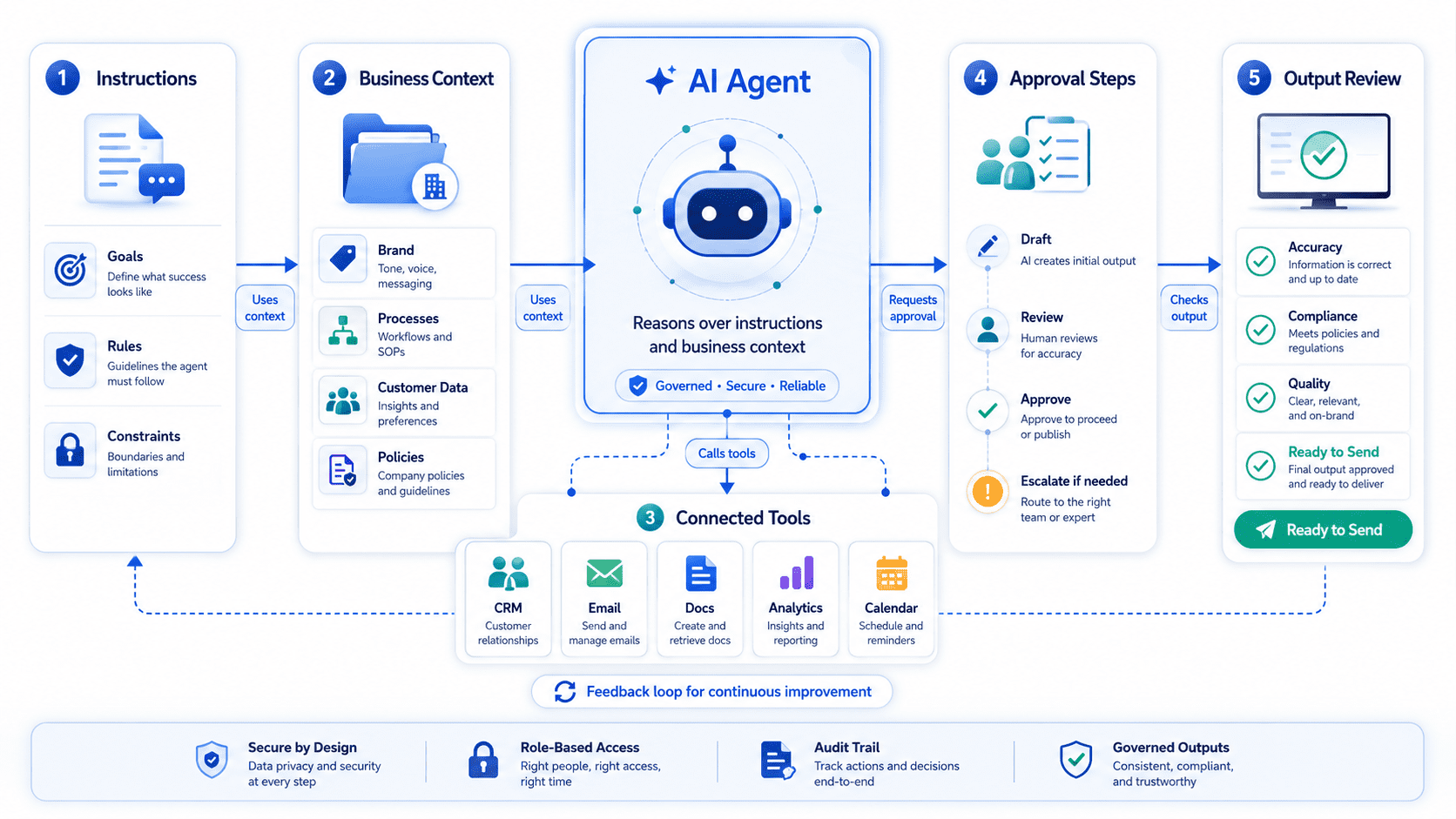
AI agents are often discussed as if they are digital employees that can simply be dropped into a business and start producing useful work.
That is not how reliable implementation works.
An AI agent is only useful when it has a clear job, enough context, access to the right tools, defined boundaries, and a process for human approval where needed. Without those pieces, the agent may produce text, summaries, or suggestions, but it will not reliably support the business.
For serious business use, an AI agent should be treated as part of an operational workflow, not as a novelty.
What an AI agent actually is
An AI agent is a system designed to perform a task or support a workflow using a combination of instructions, context, reasoning, tools, data access, and defined actions.
In plain terms, an agent needs to know:
What it is supposed to do.
What information it can rely on.
Which systems it can use.
What decisions it can make.
Where it must ask for approval.
How success or failure should be checked.
For example, an AI agent that helps triage inbound website enquiries should not simply “read messages and reply.” It needs to understand service categories, qualification criteria, CRM fields, tone of voice, escalation rules, privacy limits, and when a human should review the response.
An AI agent that helps with content operations needs access to brand guidelines, SEO priorities, existing pages, internal approval workflows, and publishing rules. Otherwise, it may create content that sounds acceptable but does not fit the business.
The agent is not the strategy. It is a system built around a specific job.
The five things an AI agent needs
1. Clear instructions
The agent needs a defined role and task.
“Help with sales” is too broad. “Review new website enquiries and suggest the correct CRM category, priority level, and follow-up notes” is much clearer.
Good instructions specify:
The agent’s purpose.
The type of input it receives.
The output it should produce.
The standard it should follow.
The actions it should not take.
The cases it should escalate.
The narrower the job, the easier it is to test and improve.
2. Reliable business context
AI agents need context that reflects how the business actually works.
That may include service descriptions, pricing rules, ideal customer profiles, qualification criteria, CRM definitions, internal process notes, FAQs, brand voice, or support policies.
If this context is outdated, unclear, or scattered across documents, the agent will struggle.
For example, if your website says you offer one-off website builds, but your sales team now focuses on monthly website operations retainers, an AI agent may qualify or respond to leads using the wrong business logic.
Before building an agent, make sure the source material is current.
3. Access to tools and systems
Some AI agents only generate outputs for humans to review. Others interact with tools.
Possible tools include:
A CRM such as HubSpot, Pipedrive, or Salesforce.
A WordPress website or content system.
A form tool.
Analytics or reporting dashboards.
A project management platform.
Email, Slack, or Microsoft Teams.
Internal documents or knowledge bases.
Automation platforms such as Zapier, Make, or custom APIs.
Tool access should be intentional. An agent should not have broad access simply because it is possible. It should have the minimum access needed for the task.
An agent that drafts CRM notes may not need permission to update deal stages. An agent that classifies support enquiries may not need permission to send customer replies without approval.
4. Workflow boundaries
A useful AI agent needs rules for what happens before and after its work.
Where does the input come from?
What triggers the agent?
Where does the output go?
Who reviews it?
What happens if confidence is low?
What happens if the agent receives incomplete data?
How are errors corrected?
This is where many AI projects fail. The agent may produce a decent output, but there is no practical workflow around it.
For example, an agent might summarise form submissions, but if those summaries are not placed in the CRM or sent to the right person, the value is limited.
5. Human approval rules
Not every task should be fully automated.
Human approval is especially important when the agent affects customers, sales decisions, pricing, legal commitments, personal data, or public content.
The approval process should be designed upfront.
An agent may draft a response, but a person sends it.
An agent may classify a lead, but sales confirms the priority.
An agent may suggest content updates, but marketing approves publication.
An agent may identify tracking issues, but a specialist checks the implementation.
The goal is not to remove people from the process. The goal is to reduce repetitive work while keeping judgement where it matters.
Business examples of practical AI agents
A website enquiry triage agent can review new form submissions, classify the enquiry type, identify missing information, suggest a response, and prepare CRM notes.
A content operations agent can review existing WordPress pages against a service strategy, identify outdated sections, suggest internal links, and prepare draft updates for approval.
A reporting assistant can review analytics and CRM summaries, flag unusual changes, and prepare plain-language notes for a monthly operations review.
A support knowledge agent can help internal teams find approved answers from documentation, rather than searching through old files and chat threads.
A sales preparation agent can summarise a prospect’s form submission, source, landing page, and CRM history before a call.
In each case, the agent is useful because it is connected to a specific workflow.
Risks of building an agent too early
AI agent projects often struggle when the business has not prepared the basics.
The process is not clearly defined.
The source information is outdated.
CRM fields are inconsistent.
Website forms do not collect enough context.
No one owns the workflow.
There is no approval process.
Success criteria are vague.
The agent is expected to solve a process problem that has not been designed.
An AI agent can improve a workflow. It cannot compensate for a completely unclear one.
Before building, define the job.
Practical AI agent readiness checklist
Task clarity
- What specific job should the agent support?
- What input will it receive?
- What output should it produce?
- What should it never do?
- What does a good result look like?
Context
- Is the business information current?
- Are service descriptions clear?
- Are qualification rules documented?
- Are tone and brand guidelines available?
- Is there a single source of truth?
Systems and tools
- Which tools does the agent need to access?
- Does it need read-only or write access?
- Are CRM fields consistent?
- Are form submissions structured clearly?
- Are API or integration requirements understood?
Workflow
- What triggers the agent?
- Where does the output go?
- Who reviews it?
- What happens when information is missing?
- How are corrections handled?
Governance
- What requires human approval?
- Who owns the agent?
- How often is performance reviewed?
- Are outputs logged?
- Are privacy and security limits clear?
Plan an AI agent around a real business workflow
Muser Agency helps businesses define, design, and set up AI agents with the right instructions, context, tools, approval steps, and operational safeguards.