

Businesses are being sold a lot of “AI solutions” under the same label. The useful question is not whether something uses AI. It is what the system can actually do, what context it has, and how safely it fits into your workflow.
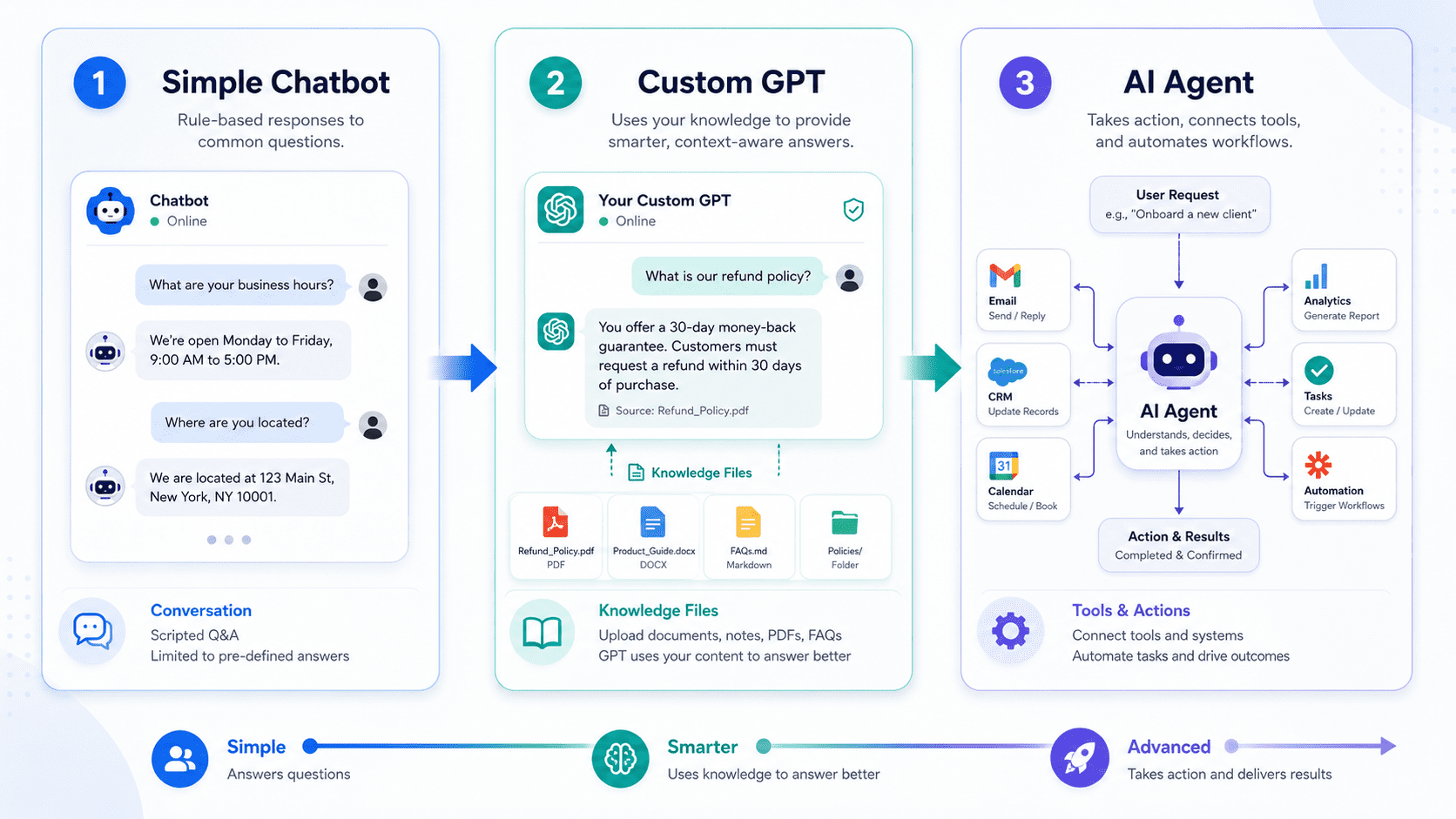
Chatbots, custom GPTs, and AI agents are not the same. The right choice depends on context, tools, workflow risk, and business goals.
AI terminology has become messy.
A website popup is called an AI assistant. A custom ChatGPT setup is called an agent. A workflow automation is described as a chatbot. A support tool with a few scripted answers is sold as intelligent automation.
For business owners and marketing teams, this creates a practical problem: it becomes hard to know what to buy, what to build, and what risk you are accepting.
A chatbot, a custom GPT, and an AI agent can all be useful. But they are not the same thing.
The difference is not just technical. It affects cost, setup time, maintenance, permissions, customer experience, and the kind of work the system can safely handle.
The short version
A chatbot usually answers questions inside a defined interface. It may follow scripts, use a knowledge base, or hand the visitor to a human.
A custom GPT is a configured AI assistant with instructions, tone, examples, and sometimes uploaded knowledge. It is useful for repeatable thinking, drafting, analysis, and internal workflows.
An AI agent can use context and tools to work through a task. It may read information, make decisions inside guardrails, call APIs, update systems, create drafts, route leads, or ask for approval before taking action.
The more action a system can take, the more design, testing, permissions, and oversight it needs.
What a chatbot is good for
A chatbot is best when the task is narrow and the visitor expects quick guidance.
On a business website, a chatbot might help visitors:
- find the right service page
- answer basic questions
- collect contact details
- start a support request
- book a meeting
- route an enquiry to the right team
This can be valuable, especially when the website has frequent questions or too many paths. But a chatbot is not automatically an AI strategy.
The weakness of many chatbots is that they sit on top of a poor website or poor lead process. They answer a few questions, but they do not fix unclear offers, weak forms, missing tracking, or slow follow-up.
For many businesses, a chatbot should be treated as a front-door assistant. It can help people move through the site, but it should not be trusted with complex judgement unless the surrounding system is properly designed.
What a custom GPT is good for
A custom GPT is different from a website chatbot. It is usually better as an internal assistant or specialist workspace.
You can configure it with instructions, examples, preferred structure, tone of voice, service positioning, audience definitions, and knowledge files. That makes it useful for repeated tasks where quality depends on context.
For an agency or growing business, a custom GPT might help with:
- drafting article briefs
- turning sales call notes into follow-up emails
- reviewing website copy against positioning
- creating proposal outlines
- generating support replies for human review
- summarising client requirements
- building content calendars
The value is consistency. Instead of prompting from scratch every time, the assistant already knows the preferred format, tone, and decision rules.
But a custom GPT is usually not the same as an automated business process. It may help a person think, draft, or analyse, but it does not necessarily connect to your CRM, update WordPress, publish content, create tasks, or move data between systems.
That distinction is important. A custom GPT can be a strong step before automation because it helps define the workflow. But if the goal is to take reliable action across systems, you are moving toward an agent or automation build.
What an AI agent is good for
An AI agent is useful when the system needs to work through a task using tools, context, and decision rules.
In practice, an agent might:
- read a new website enquiry
- classify the lead type
- summarise the message
- check which service or property page the person visited
- create or update a CRM record
- draft a reply for approval
- assign a follow-up task
- flag missing information
- notify the right person in the business
The important word is tools. An agent is not only generating text. It is connected to actions.
That makes agents powerful, but it also makes them more sensitive. A poorly designed agent can update the wrong record, send the wrong message, expose private information, or make confident mistakes at scale.
This is why good agent design is not just prompt writing. It includes permissions, workflow mapping, logging, error handling, human approval, fallback rules, and clear boundaries.
A practical example: website leads
Imagine a business receives enquiries through a website form.
A chatbot might ask a few questions before the form is submitted: what service the visitor needs, when they want help, and how they prefer to be contacted.
A custom GPT might help the sales team turn the form submission into a polished follow-up email. The team pastes in the enquiry, and the GPT drafts a response using the company tone and service positioning.
An AI agent might receive the form submission automatically, classify the enquiry, check the source campaign, create a CRM note, assign the lead, draft the email, and ask the salesperson to approve it before sending.
These are three different levels of capability. They can work together, but they should not be confused.
How to choose the right one
The right choice depends on the job.
Choose a chatbot when:
- visitors need quick guidance on the website
- questions are repetitive
- the risk of wrong answers is low
- the main goal is routing, qualification, or support intake
Choose a custom GPT when:
- your team repeats the same thinking or writing tasks
- you need consistent tone and structure
- human review is expected
- the work benefits from your internal knowledge and examples
Choose an AI agent when:
- the task spans multiple systems
- the workflow needs tool access or API actions
- speed and consistency matter
- there are clear rules for what the system can and cannot do
- you can design approval steps for higher-risk actions
The mistake to avoid
The most common mistake is starting with the AI label instead of the workflow.
A business says, “We need an AI agent,” when the real need is better form routing. Another says, “We need a chatbot,” when the real issue is unclear service pages. Another builds a custom GPT, but the team needed a CRM automation.
Start with the work:
- What happens now?
- Where does time get wasted?
- Where do leads or requests get lost?
- Which decisions require human judgement?
- Which tasks are repetitive and low-risk?
- Which systems need to exchange data?
Once the workflow is clear, the right AI layer becomes easier to choose.
A simple maturity path
For many businesses, the best path is gradual.
First, use a custom GPT internally to define the content, sales, support, or operations workflow. This helps the team understand what good output looks like.
Next, automate the parts that are clearly repetitive: notifications, CRM fields, draft creation, task assignment, tagging, and reporting.
Then, where there is enough structure and value, build an agent that can use tools inside safe limits.
This approach is less flashy than launching a large AI system immediately, but it is usually more reliable.
Readiness checklist
- Do you know the exact workflow you want to improve?
- Is the task customer-facing or internal?
- Does the system need to answer, draft, or take action?
- What data should it be allowed to access?
- What should require human approval?
- Where should actions be logged?
- What happens when the AI is uncertain?
- How will you measure whether it saves time or improves lead quality?
How Muser Agency can help
Muser Agency helps businesses design practical AI workflows across websites, forms, CRMs, content systems, and internal operations. If you are unsure whether you need a chatbot, a custom GPT, or an AI agent, the best first step is mapping the workflow and choosing the smallest useful system.