



A practical guide to finding the weak points between website forms, CRM handoff, notifications, tracking, and sales follow-up.
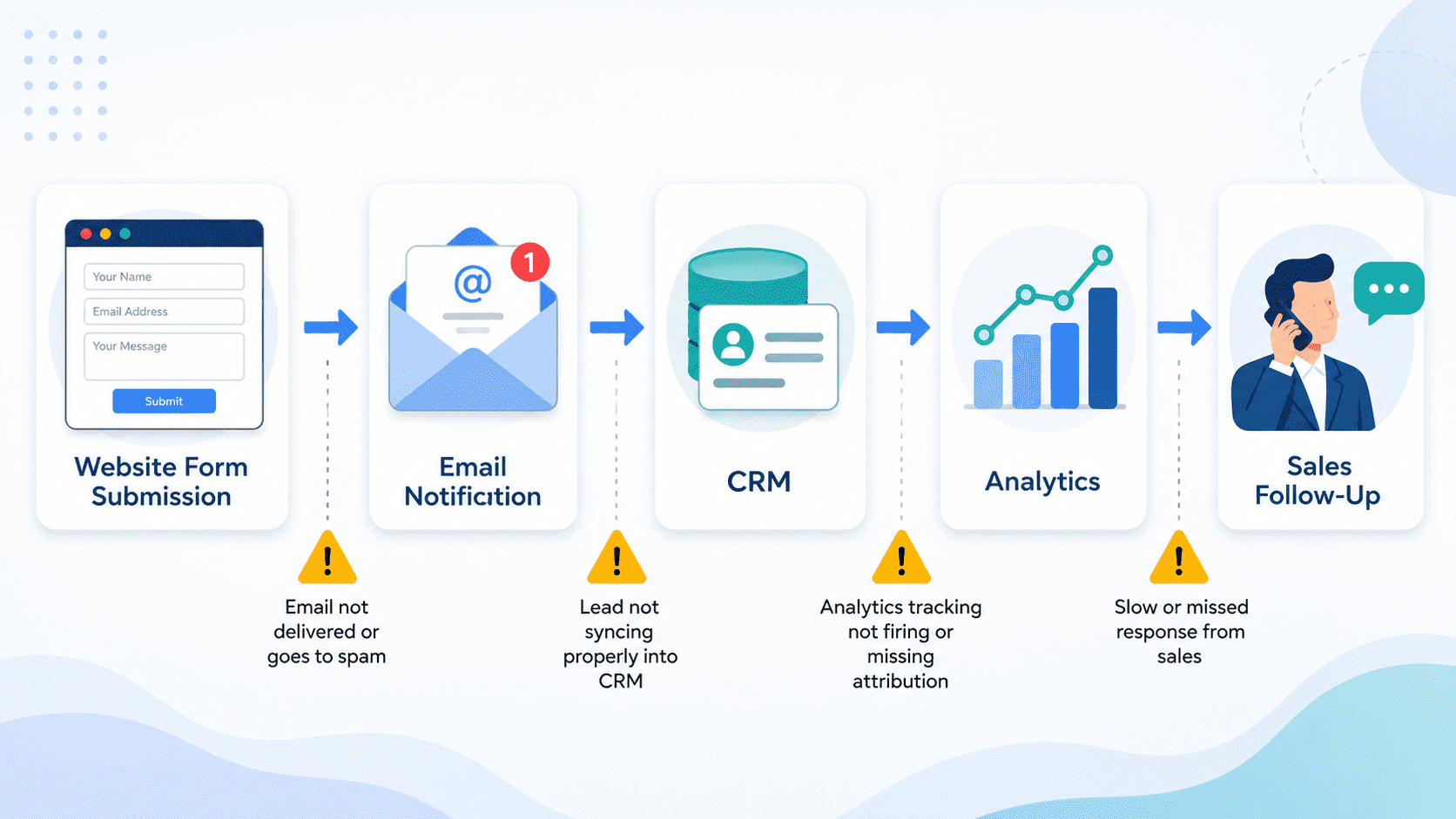
A website form submission can feel like the finish line.
A visitor finds your business, reads your service page, trusts you enough to share their details, and clicks submit. From a marketing perspective, that looks like a conversion.
Operationally, it is only the beginning.
The real business value depends on what happens next. Does the enquiry reach the right inbox? Is it recorded in the CRM? Is the source tracked correctly? Does the sales team know what the person asked for? Is there a backup if the email notification fails? Can anyone confirm the form worked last week, yesterday, or this morning?
Many businesses do not lose leads because their website looks bad. They lose leads because the lead journey after form submission is fragile, unmonitored, or dependent on one person noticing something has gone wrong.
A form submission is part of an operational chain
A typical website lead flow may include:
A WordPress form, a confirmation message, an email notification, a CRM record, a sales task, a Slack or Teams alert, analytics tracking, ad conversion tracking, and sometimes an automated email to the prospect.
Each step is small. Each step can fail.
For example, a business may use Gravity Forms, WPForms, Contact Form 7, HubSpot, Pipedrive, Salesforce, Mailchimp, Zapier, Make, Google Tag Manager, Google Analytics, Meta Ads, Google Ads, or a custom API connection.
That setup may work perfectly when launched. But websites are not static. Plugins update. CRM fields change. API keys expire. Spam filtering changes. Tracking scripts get removed during redesigns. A new form is added to a landing page but not connected to the same workflow as the main contact form.
The problem is rarely one dramatic failure. More often, it is a quiet break in the chain.
Common ways businesses lose leads after submission
The most obvious failure is the form not sending at all. But many lead-flow problems are less visible.
An enquiry may reach the website database but not the sales inbox. The business thinks there were no enquiries, while the WordPress backend quietly stores them.
A form notification may go to a former employee. This is common after team changes, especially when forms were configured years ago and no one has reviewed the recipients.
A CRM integration may create a contact but fail to create a deal, task, or lifecycle stage. Sales teams then miss the context or fail to prioritise the lead.
A required CRM field may change, causing API submissions to be rejected. The website still shows a success message, but the CRM never receives the record.
An email notification may be delivered to spam or quarantined by Microsoft 365 or Google Workspace. From the website’s perspective, the message was sent. From the team’s perspective, it disappeared.
Tracking may record the pageview but not the form submission. Marketing sees traffic but cannot evaluate which campaigns generate real enquiries.
A thank-you page may be removed, renamed, or excluded from analytics. Conversion tracking breaks, but the form itself appears to work.
A landing page may use a cloned form with different notification rules. Leads from the main contact page work, while campaign leads go nowhere useful.
None of these issues require the website to be “down.” That is why uptime monitoring alone is not enough.
Why the confirmation message can be misleading
One of the most dangerous assumptions is: “The user saw a success message, so the lead was received.”
A confirmation message only proves that the front-end form accepted the submission. It does not always prove that the submission was emailed, stored, synced, assigned, tracked, or followed up.
This distinction matters.
A prospect does not care whether the problem was caused by SMTP authentication, CRM validation, a broken webhook, a plugin conflict, or a missing email alias. They submitted a request and expected a response.
If no one replies, the business looks slow or careless. The lead may contact a competitor within minutes.
Lead loss is often a process issue, not a marketing issue
When lead volume drops, teams often look at ads, SEO, copy, or design first. Those may be valid areas to review. But before increasing spend or rebuilding pages, it is worth checking whether the existing lead flow is actually working.
A business may be paying for traffic that converts into form submissions, but those submissions are not reaching the sales process cleanly.
That means the problem is not demand generation. It is operational leakage.
Examples include:
A Google Ads campaign drives enquiries, but the campaign field is not passed into the CRM. The sales team cannot tell which leads came from paid search.
A WordPress form collects service interest, but the CRM maps every enquiry as “general contact.” Sales cannot segment by need.
A downloadable guide form adds people to an email list, but does not alert anyone when a high-value company submits.
A quote request form asks for project budget, but that field is not visible in the sales notification.
The website technically “works,” but the business loses speed, context, and accountability.
Practical lead-flow diagnostic checklist
Use this checklist to review your current setup.
Form submission checks
- Submit a test enquiry from every important form on the website.
- Test desktop and mobile.
- Test contact forms, quote forms, newsletter forms, gated content forms, and campaign landing page forms.
- Confirm the user sees the correct confirmation message or thank-you page.
- Check whether the submission is stored in WordPress or the form tool.
Notification checks
- Confirm who receives each notification.
- Remove former employees or outdated shared inboxes.
- Check whether notifications include all useful fields.
- Confirm replies go to the prospect, not the website admin address.
- Test deliverability to Google Workspace or Microsoft 365 inboxes.
CRM and sales handoff checks
- Confirm the lead appears in the CRM.
- Check whether contact, company, deal, source, and owner fields are populated correctly.
- Confirm sales tasks or alerts are created when needed.
- Check whether duplicate contacts are handled correctly.
- Review what happens when required CRM fields are missing.
Tracking checks
- Confirm the form submission is tracked in analytics.
- Confirm ad conversion tags still fire.
- Check whether source, medium, campaign, and landing page data are captured.
- Review whether thank-you pages still exist and are indexed or excluded appropriately.
- Test tracking after cookie consent choices where relevant.
Failure and backup checks
- Confirm there is a fallback record of submissions.
- Review recent failed webhook or integration logs.
- Check SMTP logs if available.
- Document who is responsible for investigating failures.
- Set a recurring schedule for test submissions.
What monthly lead-flow monitoring should include
Lead-flow monitoring is not the same as glancing at analytics once a month.
A practical monthly review should include live form tests, CRM handoff checks, notification verification, tracking validation, and review of any failed automation logs. It should also include a short written summary of what was tested, what changed, and what needs attention.
For businesses that rely on inbound enquiries, this is not technical housekeeping. It protects revenue opportunities.
A good recurring process answers simple but important questions:
Are leads reaching the right people?
Is the CRM receiving clean data?
Can marketing trust the conversion numbers?
Has anything changed since last month?
Are there weak points that need improvement?
Protect the leads your website already generates
Muser Agency helps businesses monitor and improve the full path from website form submission to sales follow-up. Our monthly lead-flow monitoring service checks forms, notifications, CRM handoff, tracking, and integration health so your team can trust the enquiries your website generates.