



Learn how manual website, CRM, and admin tasks slow growth, create errors, and signal when automation is worth improving.
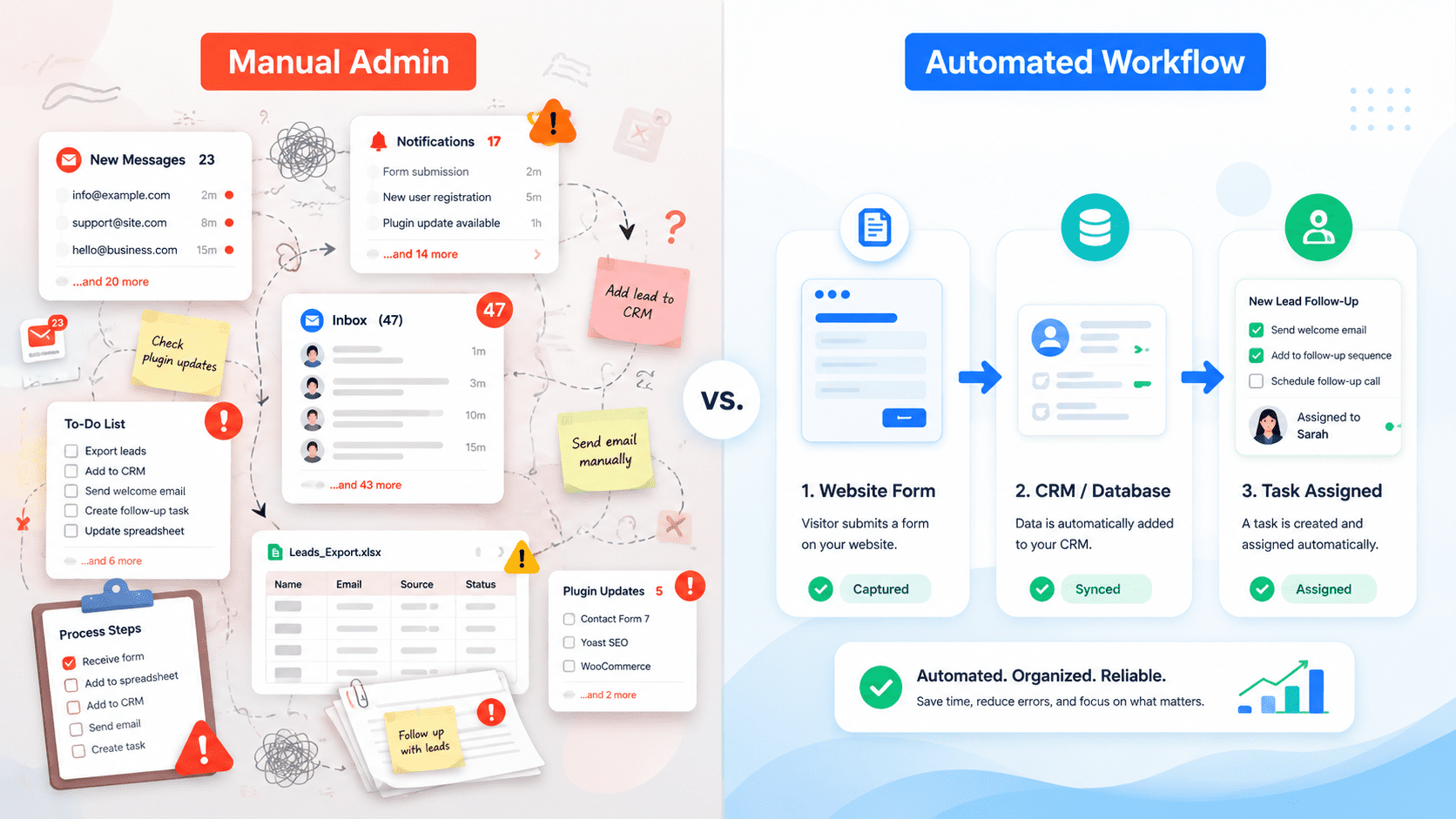
Manual admin is not automatically a problem.
In a small business, manual steps can be useful. They give the team control, flexibility, and visibility. When enquiry volume is low, it may be reasonable for someone to copy details from a website form into a CRM, send a follow-up email, update a spreadsheet, and notify a colleague.
The problem starts when the same manual steps become part of daily operations, but no longer fit the volume, speed, or accuracy the business needs.
At that point, manual admin becomes a growth bottleneck.
Not because the team is careless. Because the process depends on people doing repetitive work perfectly, every time, while also handling sales, delivery, marketing, and customer service.
Growth exposes weak processes
A manual process often works until the business gets busier.
Five enquiries a month can be handled manually. Fifty enquiries across different services, locations, or campaigns create a different problem.
The business may start to see delays, missed follow-ups, inconsistent CRM records, duplicate contacts, unclear ownership, and reporting gaps.
The website may be generating interest, but the operational process behind it cannot keep up.
Common signs include:
Leads sitting in inboxes before being entered into the CRM.
Team members asking, “Did anyone reply to this?”
Campaign enquiries being mixed with general contact messages.
Sales reports not matching website form submissions.
Spreadsheets being used as a second CRM.
Manual copy-and-paste between tools.
Follow-up emails being rewritten from scratch.
Important fields being skipped because the form and CRM do not match.
None of these issues feel catastrophic in isolation. Together, they slow the business down.
Where manual admin commonly appears
Manual bottlenecks often sit between the website and the systems used to run the business.
Website forms to CRM
A visitor submits a quote request on a WordPress website. The form sends an email to the office. Someone reads the email, creates a contact in the CRM, copies the message, adds a deal, assigns an owner, and maybe creates a follow-up task.
This can work at low volume. But it introduces delay and inconsistency.
A better workflow might create or update the contact automatically, create a deal with the correct service interest, assign ownership based on region or service type, and create a task for follow-up.
The team still reviews and responds. Automation simply removes the repetitive handoff.
Enquiries to internal alerts
Some enquiries require quick action. A high-value quote request, support escalation, demo request, partnership enquiry, or job application should not sit unnoticed in a shared inbox.
Manual routing depends on someone watching the inbox at the right time.
Automation can send structured alerts to Slack, Microsoft Teams, email, or a CRM queue. The alert can include the most important fields: name, company, service interest, budget range, source, and message.
This helps the team respond with context.
Lead source tracking
Marketing decisions depend on knowing where enquiries came from.
If source data is manually interpreted, it often becomes unreliable. A sales person may mark a lead as “website” even if it came from Google Ads, LinkedIn, organic search, or a partner campaign.
Automation can pass hidden fields, UTM parameters, landing page data, and form source into the CRM. This does not make reporting perfect, but it gives the business a much stronger starting point.
Repeated customer communications
Many businesses manually send similar emails after enquiries.
“Thanks for contacting us.”
“Here is what happens next.”
“Please send these details.”
“Book a call here.”
“We received your application.”
These messages can often be templated or automated, while still allowing personal follow-up where it matters.
The goal is not to remove human judgement. It is to stop spending human attention on the same administrative step hundreds of times.
Why manual processes create business risk
Manual admin affects more than efficiency.
Delay
A lead submitted at 9:00 may not be entered into the CRM until 15:00. By then, the prospect may have contacted other providers.
Speed is especially important when the enquiry is high-intent: quote requests, demo requests, consultation bookings, urgent support needs, or procurement questions.
Inconsistency
Different people record information differently.
One person creates a CRM deal. Another only creates a contact. One person adds the source. Another leaves it blank. One person copies the full message. Another summarises it.
Inconsistent records make reporting and follow-up harder.
Error
Manual copy-and-paste creates mistakes.
Phone numbers are mistyped. Email addresses are copied with spaces. Budget fields are missed. Companies are duplicated. Attachments are forgotten.
The more tools involved, the more chances for error.
Lack of visibility
If the process depends on inboxes and spreadsheets, managers struggle to see what is happening.
How many enquiries came in last week?
Which campaign generated them?
How quickly did sales respond?
Which service generated the most qualified leads?
Which enquiries are still open?
Manual admin makes these questions harder to answer.
When automation is worth improving
Automation is not always the answer. A bad process automated too early can create confusion faster.
Before automating, define the process clearly.
What should happen when a form is submitted?
Which fields are required?
Who owns the lead?
What should happen for different enquiry types?
What should be tracked?
What should happen if the automation fails?
Automation is worth considering when a task is repeated, rule-based, time-sensitive, error-prone, or important for reporting.
Good examples include:
Creating CRM contacts from WordPress form submissions.
Routing leads by service, region, or budget.
Sending internal alerts for high-priority enquiries.
Creating sales tasks after quote requests.
Passing UTM data into the CRM.
Adding newsletter subscribers to the correct segment.
Triggering onboarding steps after a client form is completed.
Syncing booking forms with internal workflows.
Poor examples include automating unclear sales qualification, replacing important personal communication, or building a complex workflow no one will maintain.
Practical automation diagnostic
Use this diagnostic to identify where manual admin is limiting growth.
Repetition
- Which tasks are repeated every week?
- Which tasks involve copying information between tools?
- Which emails are written from the same template repeatedly?
- Which admin steps are triggered by website forms?
Delay
- Where do enquiries wait for a person to move them forward?
- Which steps are blocked outside working hours?
- Which high-intent leads need faster routing?
- Where does follow-up depend on someone checking a shared inbox?
Accuracy
- Which fields are often missed or entered inconsistently?
- Where do duplicate contacts or deals appear?
- Which spreadsheets duplicate information already stored elsewhere?
- Which reports are hard to trust because data is incomplete?
Ownership
- Who receives each type of enquiry?
- Who is responsible for follow-up?
- What happens when that person is away?
- Are tasks created automatically or manually?
Maintenance
- Where do existing automations rely on one undocumented Zap, webhook, or plugin?
- Are failures reviewed?
- Are API keys and connected accounts owned by the business?
- Is there documentation for the workflow?
Automation needs maintenance too
Automation is not a one-off project.
Forms change. CRM fields change. Sales processes change. Tools update. Authentication expires. A workflow that worked six months ago may still run, but no longer match how the business operates.
That is why automation should be reviewed as part of ongoing website and operations support.
A monthly review might check failed tasks, field mappings, CRM records, notification rules, and whether the automation still supports the current process.
The best automation is not the most complex. It is the one the team can trust, understand, and maintain.
Reduce the admin work slowing your team down
Muser Agency helps businesses maintain and improve the connections between WordPress forms, APIs, CRMs, automations, and reporting tools. Our form/API/CRM integration maintenance support is designed for teams that need their lead and admin workflows to keep working as the business changes.